
eMuhasebe Logo
eMuhasebe OfficeSign UpLog In
  • Features
    • e-Fatura
    • Personel Yönetimi
    • e-Ticaret Entegrasyonu
    • CRM
    • Şube YönetimiNew
    • Kategori Bazlı Gelir Gider Analizi
    • Sınırsız Kullanıcı ve Detaylı YetkilendirmeNew
    • Cari Hesap Takibi
    • Mali Müşavir Ofis Yönetimi
    • KDV Takibi
    • Modüler Yapı
    e-FaturaPersonel Yönetimie-Ticaret EntegrasyonuCRMŞube YönetimiNewKategori Bazlı Gelir Gider AnaliziSınırsız Kullanıcı ve Detaylı YetkilendirmeNewCari Hesap TakibiMali Müşavir Ofis YönetimiKDV TakibiModüler Yapı
  • Pricing
  • Blog
  • Contact
  • For Accountants
Log InSign UpeMuhasebe Office
  1. Home
  2. Blog
  3. Ikas Integration – Automate Your E-commerce Invoicing with emuhasebe

Ikas Integration – Automate Your E-commerce Invoicing with emuhasebe

By:emuhasebe
May 1, 2026· 2 min readE-commerce Integrations
Ikas Integration – Automate Your E-commerce Invoicing with emuhasebe

The Ikas Integration is now available in emuhasebe! By connecting your Ikas-based e-commerce store with emuhasebe, you can effortlessly invoice your sales. Instead of manually processing each order, all your sales are instantly transferred into the system and invoices are generated automatically.

This feature provides a significant advantage for rapidly growing e-commerce businesses. Since orders from your Ikas store are directly synchronized with the emuhasebe panel, you save time and minimize the risk of errors.

Advantage of Multi-store Management

If you manage multiple Ikas stores, you can control all your sales from a single panel. This allows you to consolidate reports from different stores and make your accounting processes far more efficient.

How to Use the Ikas Integration?

  1. Go to the Marketplace Settings section.

  2. Click on Ikas.

  3. Enter the API credentials you generated in your Ikas store into emuhasebe.

  4. Save and activate the integration.

After completing these steps, your sales from Ikas will automatically flow into emuhasebe and invoicing will be managed quickly and seamlessly.

Required Settings

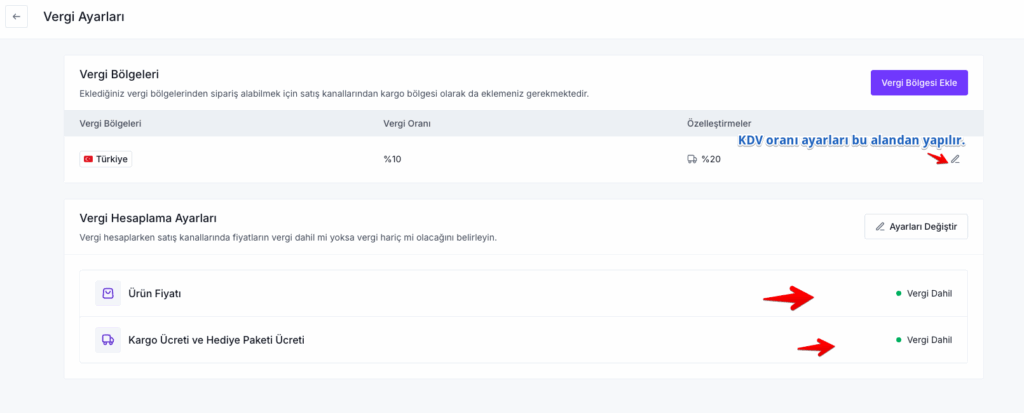
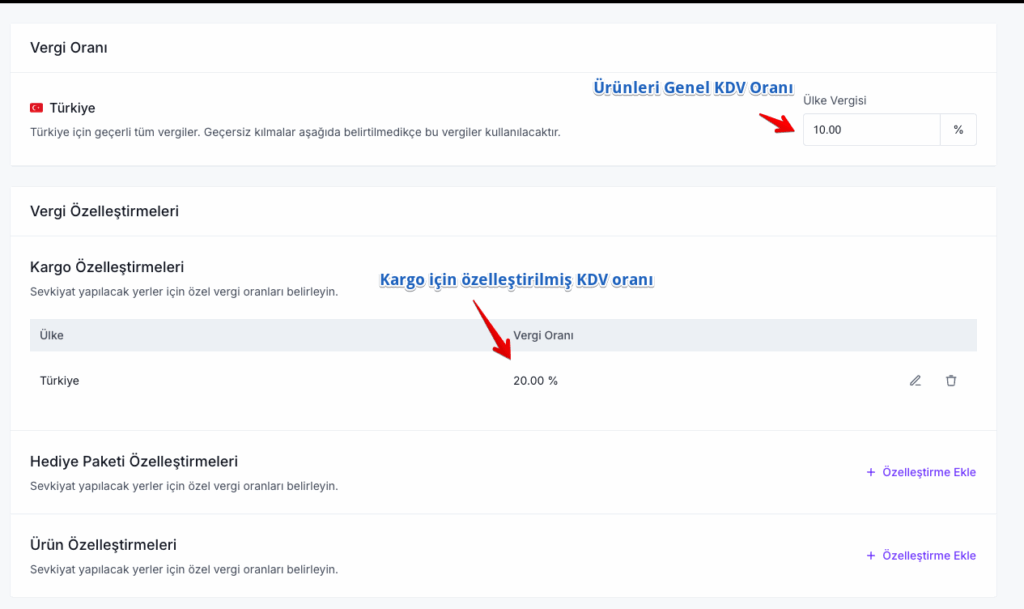
  • In your Ikas panel, go to Settings > Tax Settings and define fixed VAT rates and VAT rates for shipping.
  • In the Settings section, make sure your store URL is written in the format: https://yourstore.myikas.com.

Who Benefits Most?

  • E-commerce businesses operating on Ikas infrastructure

  • Companies managing multiple Ikas stores

  • Accountants and SMEs who want to digitalize invoicing processes

With Ikas integration, the entire process from sales to invoicing becomes faster, easier, and more reliable.

Tags:

#E-commerce Invoicing#emuhasebe Features#Ikas Integration#Marketplace Integration

emuhasebe

eMuhasebe Yazılım Teknolojileri

Related Posts

E-commerce Integrations

Trendyol Integration – Automate Your Sales Invoicing with eMuhasebe

May 1, 2026

General

Best Accounting Software and E-Invoicing Pricing – Try eMuhasebe for Free

May 1, 2026

E-commerce Integrations

Shopify Integration – Automate Your E-commerce Invoicing with emuhasebe

May 1, 2026

Back to Blog

Categories

  • All Posts(9)

Recent Posts

  • Trendyol Integration – Automate Your Sales Invoicing with eMuhasebe
    May 1, 2026
  • Best Accounting Software and E-Invoicing Pricing – Try eMuhasebe for Free
    May 1, 2026
  • Ikas Integration – Automate Your E-commerce Invoicing with emuhasebe
    May 1, 2026
  • Shopify Integration – Automate Your E-commerce Invoicing with emuhasebe
    May 1, 2026
  • Opencart Store Integration – Automate Your E-commerce Invoicing with emuhasebe
    May 1, 2026
eMuhasebe Logo

Muratreis Mh. Selamet Sk. No:9 Üsküdar - İstanbul
0216 606 38 09

eMuhasebe

  • İletişim
  • Fiyatlar
  • Blog
  • Ön Muhasebe Paneli
  • Mali Müşavir Paneli

Yasal

  • Kullanıcı Sözleşmesi
  • İade Politikası
  • KVKK
  • Çerezler

Mobil Uygulama (Yakında)

App StoreGoogle Play

© 2026 Tüm hakları saklıdır. eMuhasebe Yazılım Teknolojileri Anonim Şirketi